Menu

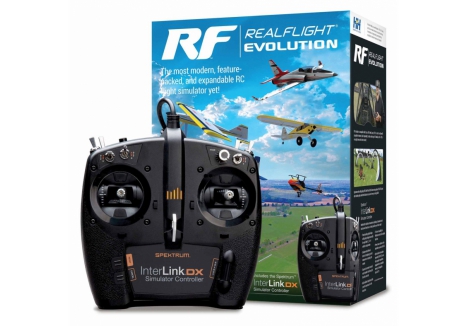
REALFLIGHT RealFlight Evolution RC Flight Simulator with InterLink A-RFL2000

Model No: A-RFL2000


Next Working Day Delivery Order before 2pm

In Stock for Immediate Dispatch

Next Working Day Delivery

£209.99

£24.75

£185.24

Inc VAT & delivery

In Stock
Delivery Included
1 Year Warranty
We Accept

Product Details

RealFlight Evolution "evolves" the world's most popular RC flight sim with a modern user interface while adding dozens of fields and more than 100 additional aircraft models. It also gives you access to new models and fields that are released quarterly!

Key Features

  • A fresh and modern user interface that's even easier and more intuitive to use, virtually eliminating the need to use a mouse or keyboard with the InterLink DX controller
  • More than a dozen of the newest and most popular ultra micro, sport, scale, EDF and trainer aircraft from E-flite, HobbyZone and Hangar 9 plus multiple helicopters from Blade
  • Fly at the newest PhotoField - the main flying site from Triple Tree Aerodrome, home of the world-famous "Joe Nall" and other events
  • More than 100 additional aircraft plus dozens of 3D fields and PhotoFields previously only available separately via Expansion Packs
  • Access to new models and fields released quarterly (starting in early 2023) for purchase à la carte, in money-saving content packs, or with yearly season passes
In The Box
  • (1) Spektrum InterLink® DX Simulator Controller
  • (1) RealFlight Evolution Steam® Code (on card)
  • (1) RealFlight Evolution Installation Guide
Needed to Complete
  • Compatible PC laptop or desktop with Windows® 8, Windows 10 or Windows 11
  • Internet connection to download the Steam® Client and RealFlight Evolution software

The most modern, feature-packed, and expandable RC flight simulator yet!

For more than two decades, RealFlight® has been the #1 RC flight simulator in the world! It's the absolute best tool new RC pilots can use when learning how to fly. It also makes it possible for experienced RC pilots to practice new maneuvers and hone their skills so they can become even better pilots. Plus, it's the best way to "try" new Horizon Hobby and other models before you buy them!

With more than 300 different aircraft to fly — including airplanes, helicopters, drones, and more — at over 75 different flying sites, plus the ability to edit and add aircraft and sites, there's an almost infinite number of flying options available. Add in Virtual Flight Instructor lessons, game-like challenges, multiplayer options so you can fly and compete with other pilots online, compatibility with VR headsets, and many, many more features, and you have everything you need to succeed at the field — because you can "fly" on a desktop at home, or on a laptop just about anywhere else!

RealFlight Evolution "evolves" the world's most popular RC flight sim with a fresh and modern user interface, adds the main flying site from Triple Tree Aerodrome – home of the world-famous "Joe Nall" and other events – plus dozens of other 3D fields and PhotoFields. It also adds more than a dozen of the newest and most popular aircraft from E-flite®, HobbyZone®, Hangar 9® and Blade®, and more than 100 additional aircraft models. Best of all, it also gives you access to new models and fields that will be released quarterly (starting in early 2023) for purchase à la carte, in money-saving content packs, or with yearly season passes!

That access to new models and fields comes as a result of RealFlight Evolution being delivered exclusively via Steam® – the world's largest digital distribution platform for PC games and simulators. Steam eliminates the need to use DVDs and compatible drives for installation, provides seamless and automatic software updates, and even allows you to install RF Evolution on multiple PCs using the Steam Client and your account. There's no serial number to lose over time and it's easier than ever to add RealFlight to additional PCs in the future!

RF Evolution runs on a wide variety of PCs (Personal Computers) from low-cost laptops to "gaming" desktops running Windows® 8, 10 or 11. It's available as software only, or with the Spektrum InterLink® DX Simulator Controller – which connects directly to a USB port for easy plug-and-play use – that's modeled after Spektrum transmitters including all standard switch locations and functions so it works just like your favorite radio! Or you can use the WS2000 USB Dongle (sold separately) with a compatible Spektrum 2.4GHz transmitter, like the DXS transmitter included with many of the most popular Ready-To-Fly (RTF) trainer aircraft, for wireless operation. It's even compatible with direct USB connection to Spektrum NX6, NX8, NX10 and other transmitters!

RealFlight Evolution includes some of the newest and most popular aircraft from E-flite, HobbyZone, Hangar 9 and Blade:

  • E-flite UMX Timber X with AS3X® and SAFE® Select Technologies
  • E-flite UMX Ultrix with AS3X and SAFE Select Technologies
  • E-flite UMX Radian with AS3X and SAFE Select Technologies
  • E-flite Night Radian 2.0m with AS3X and SAFE Select Technologies
  • E-flite T-28 Trojan 1.2m with AS3X and SAFE Select Technologies
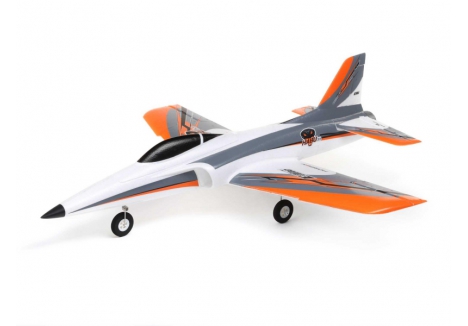
  • E-flite Habu SS (Super Sport) 50mm EDF with AS3X and SAFE Select Technologies
  • E-flite Habu SS (Super Sport) 70mm EDF with AS3X and SAFE Select Technologies
  • E-flite F-16 Falcon 80mm EDF with AS3X and SAFE Select Technologies
  • E-flite Viper 90mm EDF with AS3X and SAFE Select Technologies
  • HobbyZone Carbon Cub S 2 1.3m with SAFE Technology
  • Hangar 9 Fun Scale PT-19 56.5" EP
  • Hangar 9 Ultra Stick 60" EP
  • Hangar 9 Ultra Stick 60" 10cc
  • Blade 150 S Helicopter with AS3X and SAFE Technologies
  • Blade InFusion 180 Helicopter with AS3X and SAFE Technologies
  • Blade Fusion 480 (550) Stretch Helicopter

If you purchased RealFlight 9.5S at any time you will receive a free copy of RealFlight Evolution! Internet connectivity is required to download the software via Steam after RF Evolution is released on October 28th, 2022.

Or, if you purchased RealFlight 9 or 9.5 at any time you can exchange the serial number for a Steam key to update to 9.5S at no charge! Internet connectivity is required to complete the exchange using the link below:

Use this link to exchange your serial number.

Then you can purchase and download RF Evolution via Steam at the discounted price after it's released on October 28th, 2022.

New RealFlight Evolution Features

  • A fresh and modern user interface that's even easier and more intuitive to use, virtually eliminating the need to use a mouse or keyboard with the InterLink DX controller
  • More than a dozen of the newest and most popular ultra micro, sport, scale, EDF and trainer aircraft from E-flite, HobbyZone and Hangar 9 plus multiple helicopters from Blade
  • Fly at the newest PhotoField – the main flying site from Triple Tree Aerodrome, home of the world-famous "Joe Nall" and other events
  • More than 100 additional aircraft plus dozens of 3D fields and PhotoFields previously only available separately via Expansion Packs
  • Access to new models and fields released quarterly (starting in early 2023) for purchase à la carte, in money-saving content packs, or with yearly season passes
  • Additional Virtual Flight Instructor lessons for new pilots learning to fly with the HobbyZone AeroScout 1.1m

Additional RealFlight Features

    • Industry-leading True-To-Life physics that make every flight more lifelike than any other sim
    • A simple and intuitive interface for zero learning curve, zero hassle, and more fun
    • More than 300 aircraft including airplanes, helicopters, drones, and more
    • Over 75 different flying sites including 3D fields and PhotoFields
    • FlexiField Site Editor so you can make fields your own
    • The ability to edit aircraft and import custom aircraft
    • Virtual Flight Instructor lessons perfect for new pilots
    • Game-like challenges that make flying fun and interactive
    • Multiplayer options so you can fly or compete with other pilots online
    • Compatible with Oculus Rift, Meta Quest, HTC® Vive and other SteamVR-compatible headsets (sold separately)
    • Works with Spektrum wireless simulator dongles for use with compatible DSM2/DSMX equipped transmitters (sold separately)
    • Compatible with Spektrum NX6, NX8, NX10 and other transmitters (sold separately) via direct USB connection
    • Join the community for additional information, support and tips, to access the model Swap Pages and more on the RealFlight Forums:
Click Here To Access The RealFlight Forums

Spektrum InterLink DX Simulator Controller Features

  • Modeled after Spektrum transmitters including all standard switch locations and functions so it works just like your favorite radio
  • Patent-pending gimbal design with spring configuration switch for easy Mode 1, 2, 3, or 4 selection and operation
  • Exclusive Reset/Rewind button for replaying your best maneuvers or resetting after crashes
  • Easy and convenient control of most simulator functions right from the controller
  • Built-in sliders help drone pilots zero their cameras in for the best shots
  • 15-channel capability for effortless control of all available functions
  • Prevents wear and tear on your field transmitter
  • Optional adapter cord/cable set available separately to use other popular transmitters equipped with a compatible trainer port through the InterLink DX
Minimum Recommended System*
  • Windows® 7 or Windows 8 or Windows 10**
  • Intel® Pentium® 1.0GHz or equivalent
  • 512 MB RAM
  • 10 GB Hard Drive Space
  • DVD Drive
  • 3D Accelerated Video with:
    • 32 MB Dedicated Video Memory
    • Fully DirectX® 9 compliant (Shader Model 2.0 or better)
  • Spektrum® InterLink® DX Simulator Controller, a Spektrum wireless simulator dongle plus a compatible DSM2/DSMX equipped transmitter, a RealFlight® compatible controller, or other compatible Gamepad/Joystick
  • Online Activation Required
  • Internet connectivity required for activation** and to download additional content and updates
Optimal System
For Best Graphical Performance:
  • Dual Core 2.4GHz CPU
  • 2 GB RAM
  • 3D Accelerated Video with: 512 MB dedicated video memory
Multiplayer Requirements:
  • Broadband Internet connection
  • Computer microphone for voice chat
InterLink® DX Controller Requirements:
  • USB Port
  • Compatible FM or FM-selectable transmitter (if using the interface mode)***
VR Requirements:
  • Compatible with some VR sets (available separately). Check manufacturer's requirements for VR system use.
  • Works with both the Oculus Rift and HTC® Vive VR headsets
* Some graphical features may be disabled. Aerodynamic calculations will remain high quality
** Administrator access required
*** Adapter cord/cable set available separately (RFL1015) for use with the InterLink DX that will make it compatible with the trainer jacks on most Futaba® plus all JR® and Spektrum transmitters Windows is a registered trademark of Microsoft Corporation in the United States and other countries.

Potential fix for Intel iGPU compatibility issues is now available (RealFlight Evolution and 9.5S)

The latest 12th Generation Intel Core Processor computers will not work with Realflight Evolution. Click here to view potential fix's.

  • Model Number: RFL2000
  • Product Type: RC Flight Simulator Software with Controller
  • Included Controller: Spektrum InterLink DX Simulator Controller
  • Controller Channel Capability: 15 channels
  • Controller Connection: USB plug-and-play
  • Controller Features: Patent-pending gimbal design, spring configuration switch for Mode 1/2/3/4 selection, Reset/Rewind button, built-in camera sliders for drone control
  • Software Delivery: Steam platform (digital distribution)
  • Aircraft Models Included: More than a dozen newest models from E-flite, HobbyZone, Hangar 9, and Blade helicopters
  • Total Aircraft Available: Over 300 different aircraft including aeroplanes, sailplanes, helicopters, and drones
  • Included Aircraft Examples: E-flite UMX Timber X, E-flite UMX Ultrix, E-flite UMX Radian, E-flite Night Radian 2.0m, E-flite T-28 Trojan 1.2m, E-flite Habu SS 50mm and 70mm EDF, E-flite F-16 Falcon 80mm EDF, E-flite Viper 90mm EDF, HobbyZone Carbon Cub S 2 1.3m, Hangar 9 Fun Scale PT-19 56.5 EP, Hangar 9 Ultra Stick 60 EP, Hangar 9 Ultra Stick 60 10cc, Blade 150 S Helicopter, Blade InFusion 180 Helicopter, Blade Fusion 480 (550) Stretch Helicopter
  • Flying Sites Total: Over 75 different locations
  • Flying Site Types: 3D fields and PhotoFields
  • Featured Flying Site: Triple Tree Aerodrome (home of Joe Nall event)
  • Content Expansion: Quarterly releases of new aircraft models and fields starting early 2023
  • Content Purchase Options: À la carte, money-saving content packs, or yearly season passes
  • Physics Engine: Industry-leading True-To-Life physics
  • Features: Virtual Flight Instructor lessons, game-like challenges, multiplayer options, aircraft editing capabilities, custom aircraft import, FlexiField Site Editor
  • VR Compatibility: Oculus Rift, Meta Quest, HTC Vive, and other SteamVR-compatible headsets
  • Wireless Compatibility: Works with WS2000 USB dongle and compatible Spektrum 2.4GHz transmitters
  • Direct USB Transmitter Support: Spektrum NX6, NX8, NX10 and other compatible transmitters
  • Trainer Port Compatibility: Optional adapter cord/cable sets available for other popular transmitters
  • Minimum Operating System: Windows 8, Windows 10, or Windows 11
  • Minimum Processor: Intel Pentium 1.0GHz or equivalent
  • Minimum RAM: 512MB
  • Minimum Hard Drive Space: 10GB
  • Minimum Video Card: 3D accelerated with 32MB dedicated video memory, DirectX 9 compliant (Shader Model 2.0 or better)
  • Optimal Processor: Dual Core 2.4GHz CPU
  • Optimal RAM: 2GB
  • Optimal Video Card: 3D accelerated with 512MB dedicated video memory
  • Internet Requirement: Required for activation, software download, content updates, and multiplayer
  • Multiplayer Requirements: Broadband internet connection and computer microphone for voice chat
  • VR System Requirements: Compatibility varies by headset manufacturer specifications
  • Content Included: RealFlight Evolution Steam Key on card
  • Documentation Included: RealFlight Evolution Installation Guide (multilingual)
  • Regional Availability: Available worldwide including UK
  • Customer Rating: 5 out of 5

Overview

RealFlight Evolution represents the latest evolution of the world's most popular RC flight simulator, now delivered with a fresh, modern user interface that makes learning to fly easier than ever before. For more than two decades, RealFlight has been the gold standard in RC flight simulation, trusted by beginners and experienced pilots alike across the UK and worldwide. Whether you're a complete novice looking to learn the fundamentals of RC flying without risking your expensive aircraft, or an experienced pilot wanting to practise advanced maneuvers and perfect your technique, RealFlight Evolution is the ultimate training tool. This comprehensive simulator package comes complete with the Spektrum InterLink DX controller, giving you everything needed to start flying immediately.

RealFlight Evolution brings a complete overhaul to the simulator experience with its intuitive interface that virtually eliminates the need for keyboard or mouse interaction when using the included InterLink DX controller. The package delivers over 300 different aircraft models to choose from—including aeroplanes, helicopters, drones, and more—across more than 75 different flying sites, ranging from realistic 3D fields to stunning PhotoFields captured from real-world locations. This makes it the perfect ready-to-use RC simulator for anyone serious about improving their piloting skills before investing in real aircraft. The simulator is particularly valuable for those new to the RC hobby, offering a risk-free way to understand flight dynamics and control inputs before stepping up to actual models.

What truly sets RealFlight Evolution apart is its commitment to continuous expansion and modern delivery. Built on Steam, the world's largest digital distribution platform for PC games and simulators, this package ensures you'll have access to quarterly releases of new aircraft models and flying fields—available for purchase individually, in money-saving content packs, or through yearly season passes. This means your simulator investment continues to grow and improve, keeping pace with the latest releases from premium manufacturers like E-flite, HobbyZone, Hangar 9, and Blade. For RC enthusiasts in the UK seeking a professional-grade training solution that rivals actual field flying experience, RealFlight Evolution is an essential addition to your hobby setup.

Key Features

  • Modern User Interface — The completely redesigned interface is intuitive and user-friendly, making it easier than ever to navigate menus, select aircraft, and adjust settings without constantly reaching for your keyboard or mouse, ensuring smoother gameplay and more time in the air.
  • Over 300 Aircraft Models — Access an enormous library of aircraft including ultra-micro trainers, sport flyers, scale models, high-performance EDFs, and helicopters from trusted manufacturers like E-flite, HobbyZone, Hangar 9, and Blade, giving you endless variety and the ability to virtually test aircraft before purchasing real models.
  • 15-Channel Controller Capability — The included Spektrum InterLink DX controller offers 15-channel functionality, providing effortless control of all available simulator functions and allowing advanced pilots to configure complex multi-function setups for realistic radio operation.
  • Spektrum InterLink DX Simulator Controller — This premium controller is modelled after authentic Spektrum transmitters with all standard switch locations and functions, featuring a patent-pending gimbal design with spring configuration switch for easy Mode 1, 2, 3, or 4 selection, so it feels just like your actual field transmitter.
  • 75+ Flying Sites Including Triple Tree Aerodrome — Fly at the newest PhotoField featuring the main flying site from Triple Tree Aerodrome, home of the world-famous Joe Nall event, plus dozens of additional 3D fields and PhotoFields previously only available as separate expansion packs.
  • More Than 100 Additional Aircraft Models — Beyond the included aircraft, access over 100 additional models previously only available through separate expansion packs, plus the ability to edit existing aircraft and import custom models for unlimited flying possibilities.
  • Quarterly Content Updates — New aircraft models and flying fields are released quarterly (beginning in early 2023), available for individual purchase, in discounted content packs, or through yearly season passes, ensuring your simulator stays current and fresh.
  • Steam Delivery Platform — Delivered exclusively through Steam, this package eliminates the need for DVDs or physical media, provides seamless automatic software updates, and allows installation on multiple PCs using your Steam account without serial number tracking.
  • True-To-Life Physics Engine — Industry-leading realistic physics calculations create authentic flight dynamics that respond to control inputs just like real aircraft, making every flight as true-to-life as possible and providing genuine training value.
  • Virtual Flight Instructor Lessons — Comprehensive training lessons guide new pilots through the fundamentals of RC flight, covering essential skills from basic control inputs to advanced manoeuvre techniques, with additional lessons available for specific aircraft like the HobbyZone AeroScout.
  • Game-Like Challenges — Interactive challenge modes make flying fun and engaging, adding game-like objectives to your training sessions that build skills progressively and keep your practice sessions interesting and rewarding.
  • Multiplayer Options — Fly or compete with other RC pilots online, adding a social and competitive element to your simulator experience and allowing you to test your skills against fellow enthusiasts.
  • VR Compatibility — Compatible with Oculus Rift, Meta Quest, HTC Vive, and other SteamVR-compatible headsets (sold separately), providing an immersive virtual reality flying experience that elevates training and entertainment value.
  • FlexiField Site Editor — Customise and create your own flying fields using the FlexiField site editor, allowing you to design unique environments and personalise your flying experience according to your preferences.
  • Reset and Rewind Function — The exclusive Reset/Rewind button on the InterLink DX controller lets you replay your best manoeuvres or instantly reset after crashes, reducing downtime and maximising training efficiency.
  • Built-In Camera Sliders — Drone pilots benefit from integrated sliders on the controller that help zero in camera angles for the best shots, providing precise control over camera gimbal functions without needing additional hardware.
  • Wireless Transmitter Compatibility — Use the WS2000 USB Dongle (sold separately) with any compatible Spektrum 2.4GHz transmitter, or connect Spektrum NX6, NX8, NX10 and other transmitters directly via USB for wireless operation.
  • Easy Trainer Mode Setup — Optional adapter cord and cable sets allow you to use other popular transmitters equipped with compatible trainer ports through the InterLink DX, expanding your compatibility options and protecting your field transmitter investment.

Technical Performance

RealFlight Evolution is engineered to run smoothly on a wide range of PC hardware, from budget-friendly laptops to high-performance gaming desktops. The minimum system requirements include Windows 8, Windows 10, or Windows 11 running on an Intel Pentium 1.0GHz processor or equivalent, with 512MB of RAM and 10GB of hard drive space, though these are bare minimum specifications. For optimal graphical performance, Horizon Hobby recommends a system with a dual-core 2.4GHz CPU, 2GB of RAM, and 3D-accelerated video with 512MB of dedicated video memory. The software requires a 3D-accelerated video card fully compliant with DirectX 9 (Shader Model 2.0 or better) with minimum 32MB dedicated video memory, ensuring smooth rendering of detailed aircraft models and flying environments. Internet connectivity is essential for activation, downloading the Steam client, accessing additional content, and receiving automatic software updates. The Spektrum InterLink DX controller connects directly to any USB port for plug-and-play operation, requiring no additional installation or drivers. For multiplayer functionality, a broadband internet connection and computer microphone for voice chat are recommended. The physics simulation engine delivers accurate aerodynamic calculations that remain high-quality regardless of graphical settings, ensuring training value even on entry-level hardware. Those interested in virtual reality experiences can use compatible VR headsets with appropriate system specifications as defined by the headset manufacturer, creating an immersive training environment that truly brings flight simulation to life.

What's in the Box

  • Spektrum InterLink DX Simulator Controller — A premium wireless controller modelled after Spektrum radio transmitters
  • RealFlight Evolution Steam Key (on card) — Digital activation code for downloading the full software via Steam
  • RealFlight Evolution Installation Guide — Multilingual printed guide with setup instructions

What You Need to Complete

  • Compatible PC desktop or laptop running Windows 10 or Windows 11
  • Internet connection for downloading the Steam client and RealFlight Evolution software
  • USB port on your computer for controller connection

Frequently Asked Questions

  • Is RealFlight Evolution suitable for complete beginners to RC flying? — Absolutely. RealFlight Evolution is specifically designed as an ideal learning tool for new RC pilots, featuring virtual flight instructor lessons, progressive training modes, and game-like challenges that build skills step-by-step. The included Spektrum InterLink DX controller feels just like a real transmitter, helping beginners learn the controls before stepping up to actual aircraft, making it the perfect risk-free introduction to RC flying without the expense of crashes and repairs.
  • Can I use my existing Spektrum transmitter with RealFlight Evolution? — Yes. The package is compatible with multiple control options: the included InterLink DX controller, the WS2000 USB wireless dongle (sold separately) with any compatible Spektrum 2.4GHz transmitter, or direct USB connection to Spektrum NX6, NX8, NX10 and other compatible transmitters. Optional adapter cord and cable sets are available separately to use other popular transmitters equipped with compatible trainer ports, giving you maximum flexibility.
  • How often will new aircraft and fields be added to the simulator? — New aircraft models and flying fields are released quarterly beginning in early 2023. These releases are available for individual purchase à la carte, in money-saving content packs, or through yearly season passes, ensuring your simulator stays fresh and current without requiring a complete software upgrade or purchase.
  • What makes RealFlight Evolution different from earlier versions of RealFlight? — RealFlight Evolution represents a complete modernisation of the simulator with a fresh, intuitive user interface that virtually eliminates the need for keyboard or mouse operation. It includes the main flying site from Triple Tree Aerodrome (home of the world-famous Joe Nall event), more than 100 additional aircraft models previously only available as expansion packs, and quarterly access to new content released via Steam, plus dozens of new 3D fields and PhotoFields.
  • Can I edit aircraft or create custom models? — Yes, RealFlight Evolution includes the ability to edit existing aircraft models and import custom aircraft, allowing advanced users to create personalised flying experiences and potentially share their designs with the community through the RealFlight Forums.
  • Is this compatible with virtual reality headsets? — Yes, RealFlight Evolution is compatible with Oculus Rift, Meta Quest, HTC Vive, and other SteamVR-compatible headsets (sold separately), providing an immersive VR flying experience that significantly enhances training and entertainment value.
  • What are the system requirements for multiplayer? — To use the multiplayer features where you can fly or compete with other pilots online, you'll need a broadband internet connection and a computer microphone for voice chat, in addition to the standard system requirements.
  • Can I fly at realistic UK locations? — Yes. RealFlight Evolution includes over 75 different flying sites featuring both 3D fields and PhotoFields. The package specifically includes the newest PhotoField from Triple Tree Aerodrome, and with the FlexiField Site Editor, you can create custom flying fields based on your favourite local flying spots or completely unique environments.

Why Buy from RC Model Shop?

RC Model Shop is a trusted UK RC retailer and authorised dealer for all the brands we stock, including Traxxas, ARRMA, Losi, FTX, Hobbywing, Spektrum and more. Based in Walsall, we have a physical store where customers are welcome to come in, view products and purchase in store. Whether you are a seasoned competitor, a weekend basher, or just discovering the world of RC for the first time, our team of experienced RC enthusiasts is here to help you find the perfect setup and provide ongoing support. Order the REALFLIGHT RealFlight Evolution RC Flight Simulator with InterLink DX Controller today with confidence, knowing you are buying from an authorised retailer with genuine products, expert knowledge and a commitment to customer satisfaction. Shop online or visit us in Walsall — we look forward to helping you get the most out of your RC experience.

We want to make sure your delivery goes smoothly, so here are some important details about our service:

  • For orders above £120, we offer delivery to most mainland UK addresses. For orders under £120, we can still deliver to Northern Ireland and the outlying isles, as long as the item can be sent by Royal Mail, weighs less than 30kg, and fits within 61cm × 46cm × 46cm. Some highland and remote areas may carry an extra delivery charge as couriers often apply surcharges in these locations. If you live in one of these areas, feel free to contact us before ordering so we can confirm the delivery options and costs for you.
  • Most of our products include delivery in the price. If your order is under £90, a small delivery fee will apply but do not worry this will always be clearly shown at checkout before you complete your purchase.
  • Depending on what you choose at checkout, your order will usually be delivered either the next working day or within 2 working days. For next day delivery please place your order before 2:00pm. Orders are dispatched Monday to Friday only. Some items may take a little longer and if that is the case we will always show the expected delivery time on the product page.
  • If your order includes items with different dispatch times we will normally wait and send everything together once all items are in stock. If one of the items is going to take a while we will give you the choice either wait for everything to arrive or let us send the available items now and deliver the rest later. It is up to you.
  • We use trusted delivery partners to make sure your order gets to you safely and on time. We use DPD for next working day deliveries and Royal Mail for the 2 day option.
  • As soon as your order is on its way we will send you a tracking number by email. If you provide your mobile number at checkout we will also send delivery updates straight to your phone so you can keep an eye on progress.
  • If a product is marked as "Dispatched within 3 working days" delivery usually takes around 3 to 5 working days from when your order is placed.
  • For customers in Inverness and other parts of the Scottish Highlands deliveries can take up to 2 working days even if you select next day delivery as couriers do not currently offer a guaranteed next day service to those areas.