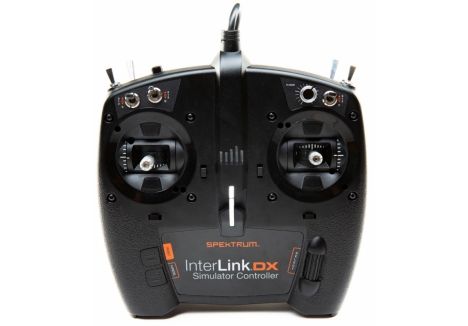
Features
- Compatible with Windows® PC platforms
- Works with most simulators - no need for multiple controllers
- High-quality Spektrum gimbals with adjustable spring and throttle tension
- Plug and play - set up through a simulator
- Easy to use Mode Change switch
- Built-in trainer jack allows you to connect and use your RC transmitter with simulators (cords sold separately)
Overview
Designed to be included with controller-equipped versions of the popular RealFlight® RC Flight Simulator, the new SpektrumT InterLink® DX RC simulator controller is so versatile and easy-to-use that it's also the perfect "go to" controller for nearly all RC simulators.
Now there's no need to keep track of multiple different sim controllers. Featuring a USB interface that's compatible with Windows® PC platforms, the Spektrum RC Simulator Controller can be used with many newer versions of RealFlight (RealFlight 8 and 8 Horizon Hobby Edition and above). It can also be used by anyone who runs an RC sim that works with USB game controllers. No additional special software is needed. The Spektrum InterLink DX RC Simulator Controller includes numerous auxiliary controls, switches, sliders and more, giving you the functionality to customize your simulator experience exactly as you wish.
The controller's unique, Spektrum brand quality shows throughout. It features durable, high-quality construction, gimbals with adjustable spring and throttle tension, and an easy-to-use Mode Change switch. The controller also has a trainer port - so you can use your field radio through the InterLink DX to control simulations if you wish.
Needed to Complete
- Computer with USB port
- Windows® platform
- Simulator software
What's in the Box?
- (1) Spektrum RC Simulator Controller
- (1) Product Manual
- Model Number: SPMRFTX1
- Product Type: RC Flight Simulator Controller
- Interface: USB Plug
- Platform Compatibility: Windows PC
- Simulator Compatibility: RealFlight 8, RealFlight 8 Horizon Hobby Edition and above, most USB game controller compatible simulators
- Gimbals: High-quality Spektrum metal gimbals
- Gimbal Features: Adjustable spring tension on pitch and roll axes
- Throttle: Adjustable throttle tension
- Control Modes: User selectable Mode 1, 2, 3, 4
- Mode Change Switch: Yes, easy to use
- Auxiliary Controls: Multiple auxiliary switches, sliders and controls
- Trainer Jack: Built-in trainer jack for field radio connection (cords sold separately)
- Setup: Plug and play, no special software required
- Construction: High-quality durable construction, modelled after DX-series transmitters
- Driver Requirements: None (Windows native USB support)
- In The Box: (1) Spektrum RC Simulator Controller, (1) Product Manual
- Needed to Complete: Computer with USB port, Windows platform, simulator software
Overview
The Spektrum InterLink DX Simulator Controller with USB Plug (SPMRFTX1) is the ultimate solution for RC enthusiasts who want to sharpen their flying skills without leaving home. Whether you're a beginner learning the fundamentals of RC flight or an experienced pilot looking to perfect your technique, this high-quality simulator controller transforms your PC into a full-featured training station. Designed and engineered by Spektrum—the trusted name in RC radio systems—the InterLink DX brings the quality and precision of professional-grade transmitters directly to your desktop, making it the perfect companion for RealFlight, FMS, and countless other RC simulators available in the UK market today.
What sets the Spektrum InterLink DX apart from generic game controllers is its purpose-built design specifically for RC simulation. Rather than adapting a standard gaming device to RC flying, Spektrum has created a controller that authentically replicates the feel and functionality of their legendary DX-series field transmitters. This means when you transition from the simulator to flying real RC aircraft and quadcopters, your muscle memory and control techniques will transfer seamlessly. The controller's robust construction, premium gimbals, and intuitive layout make it feel like a genuine RC transmitter in miniature, providing the confidence and familiarity that serious hobbyists demand.
Now there's no need to juggle multiple different simulator controllers or adapt your flying style to unfamiliar control schemes. The InterLink DX works with virtually any RC simulator that supports USB game controllers, eliminating the frustration of incompatibility issues. It's ready to plug into any Windows PC with a USB port—no special drivers or complicated software installation required—making it an accessible choice for everyone from weekend hobbyists to competitive RC pilots preparing for the next season.
Key Features
- USB Plug and Play Compatibility — This controller connects directly to your Windows PC via USB with zero-hassle setup. Simply plug it in and configure your simulator—no need for complex driver installations or additional software. This plug-and-play design makes it instantly accessible to RC pilots of all experience levels.
- High-Quality Spektrum Gimbals — The controller features authentic metal Spektrum gimbals identical to those found in professional DX-series transmitters, engineered for precision, durability and responsive control feedback. These aren't plastic components—they're built to withstand thousands of hours of simulator training without degradation.
- Adjustable Spring and Throttle Tension — You can customise the spring tension on the pitch and roll axes and adjust the throttle stick resistance to match your personal flying preferences or the characteristics of your field radio. This level of customisation ensures the controller feels exactly right for your flying style.
- Universal Simulator Compatibility — Works with RealFlight 8, RealFlight 8 Horizon Hobby Edition and above, plus most other RC simulators that support USB game controllers. This universality means your investment is future-proof and compatible with virtually any simulator software you might want to use.
- Extensive Auxiliary Controls — The controller includes numerous switches, sliders and auxiliary controls positioned conveniently around the face, allowing you to customise every aspect of your simulator experience and replicate the full functionality of sophisticated field transmitters.
- Mode Change Switch — An easy-to-use mode selection switch lets you toggle between different control configurations (Mode 1, 2, 3 and 4), accommodating different flying preferences and training scenarios without reprogramming.
- Built-in Trainer Jack — The integrated trainer port allows you to connect your actual field radio transmitter to the controller and use it within simulators, enabling seamless transitions between virtual and real-world flying. Trainer cords are sold separately.
- Durable Construction — Engineered with high-quality materials and careful attention to detail, the InterLink DX is built to deliver reliable performance through countless training sessions, making it a genuine long-term investment in your RC flying capability.
- Modelled After Professional DX-Series Transmitters — The controller's layout, feel and ergonomics are directly inspired by Spektrum's acclaimed DX-series field transmitters, meaning the controller will feel immediately familiar to Spektrum users and provide authentic training that directly translates to field flying.
Technical Performance
The Spektrum InterLink DX Simulator Controller represents a significant step up in simulator training equipment, combining engineering excellence with practical usability. Built with attention to the same standards that define Spektrum's professional radio systems, the controller features precision-engineered metal gimbals that deliver smooth, responsive control input without dead zones or inconsistencies. The adjustable spring tension and throttle resistance allow pilots to fine-tune the feel to match their preferred flying characteristics, whether they favour light, sensitive inputs or prefer a more resistant, deliberate control response. The construction quality is immediately evident from the moment you hold the controller—this is clearly a professional-grade training tool, not a repurposed gaming device. The comprehensive array of auxiliary switches and sliders provides the functionality needed to command complex aircraft and multicopters within simulation environments, replicating the real-world transmitter experience that's essential for meaningful practice. With full compatibility across Windows platforms and broad support for modern simulator software, the InterLink DX delivers the reliability and precision that serious RC pilots expect when preparing for field operations.
What's in the Box
- Spektrum RC Simulator Controller (InterLink DX)
- Product Manual (English language documentation)
What You Need to Complete
- Computer with USB port
- Windows PC platform
- RC simulator software (RealFlight 8 or later, or other compatible simulator)
Frequently Asked Questions
- What RC simulators is this controller compatible with? — The Spektrum InterLink DX works with RealFlight 8, RealFlight 8 Horizon Hobby Edition and above, as well as most other RC simulators that support standard USB game controllers. If your simulator accepts USB input, there's an excellent chance the InterLink DX will work with it. No additional special software is required—it operates as a plug-and-play USB controller.
- Do I need to install drivers or special software? — No. The InterLink DX is designed as a true plug-and-play device. Simply connect it to your Windows PC via the USB cable, and configure it within your simulator software. Windows recognises it automatically, eliminating the frustration of driver downloads and installations that plague many gaming peripherals.
- Is this suitable for beginners learning RC flight? — Absolutely. The InterLink DX is an excellent choice for beginners because it combines ease of use with professional-quality construction. The plug-and-play setup means you can start flying in minutes, whilst the authentic gimbals and control layout familiarise you with real RC transmitter design. When you progress to flying actual RC aircraft, the muscle memory you've developed on the InterLink DX will transfer directly to your field equipment.
- Can I use my own RC transmitter as a simulator controller? — Yes. The controller features a built-in trainer jack that allows you to connect your field radio transmitter to the InterLink DX, enabling you to use your personal RC radio for simulator training. Trainer cords are sold separately and connect between your transmitter and the InterLink DX trainer port.
- How do the adjustable spring and throttle tensions work? — The controller's pitch and roll axes feature adjustable spring tension, allowing you to customise how tightly or loosely the sticks return to centre after moving them. Similarly, the throttle stick tension can be adjusted to your preference. This lets you match the feel of your field transmitter or simply find the control response that suits your flying style best.
- What Windows PC requirements are there? — The controller requires only a Windows PC with an available USB port. There are no minimum processor or memory specifications. Windows 7, 8, 10 and 11 are all supported. If your computer has a USB port and can run your chosen simulator software, it will work with the InterLink DX.
- What modes does the controller support? — The InterLink DX features an easy-to-use Mode Change switch that selects between Mode 1, 2, 3 and 4, accommodating different flying preferences and control layouts. This means pilots with different stick preferences can all use the same physical controller without need for reconfiguration.
- Is this better than using a standard game controller for RC simulation? — Significantly better. Whilst game controllers work with some simulators, the InterLink DX is purpose-built for RC flying, featuring professional-grade gimbals and control layout that authentically replicate real transmitters. Game controllers lack the precision, durability and customisation options needed for serious simulator training. The InterLink DX delivers genuine RC-specific design that translates training skills to actual flying.
- How does the built-in trainer jack work? — The trainer jack allows you to connect a cable from your field radio's trainer output to the InterLink DX, effectively using your personal transmitter as the simulator controller. This is ideal for practising with your actual equipment before flying outdoors, ensuring consistency between simulator and field experience.
- What makes this different from other simulator controllers? — The InterLink DX combines Spektrum's professional-grade engineering, authentic gimbal design and extensive customisation options with genuine plug-and-play simplicity. Unlike generic solutions, it's engineered specifically for RC simulation with features like adjustable tension, mode switching and trainer port integration. The quality throughout is self-evident—this is a real training tool for serious RC pilots, not a gaming peripheral repurposed for flight simulation.
Why Buy from RC Model Shop?
RC Model Shop is a trusted UK RC retailer and authorised dealer for all the brands we stock, including Traxxas, ARRMA, Losi, FTX, Hobbywing, Spektrum and more. Based in Walsall, we have a physical store where customers are welcome to come in, view products and purchase in store. Whether you are a seasoned competitor, a weekend basher, or just discovering the world of RC for the first time, our team of experienced RC enthusiasts is here to help you find the perfect setup and provide ongoing support. Order the SPM InterLink DX Simulator Controller (USB Plug) P-SPMRFTX1 today with confidence, knowing you are buying from an authorised retailer with genuine products, expert knowledge and a commitment to customer satisfaction. Shop online or visit us in Walsall — we look forward to helping you get the most out of your RC experience.
We want to make sure your delivery goes smoothly, so here are some important details about our service:
- For orders above £120, we offer delivery to most mainland UK addresses. For orders under £120, we can still deliver to Northern Ireland and the outlying isles, as long as the item can be sent by Royal Mail, weighs less than 30kg, and fits within 61cm × 46cm × 46cm. Some highland and remote areas may carry an extra delivery charge as couriers often apply surcharges in these locations. If you live in one of these areas, feel free to contact us before ordering so we can confirm the delivery options and costs for you.
- Most of our products include delivery in the price. If your order is under £90, a small delivery fee will apply but do not worry this will always be clearly shown at checkout before you complete your purchase.
- Depending on what you choose at checkout, your order will usually be delivered either the next working day or within 2 working days. For next day delivery please place your order before 2:00pm. Orders are dispatched Monday to Friday only. Some items may take a little longer and if that is the case we will always show the expected delivery time on the product page.
- If your order includes items with different dispatch times we will normally wait and send everything together once all items are in stock. If one of the items is going to take a while we will give you the choice either wait for everything to arrive or let us send the available items now and deliver the rest later. It is up to you.
- We use trusted delivery partners to make sure your order gets to you safely and on time. We use DPD for next working day deliveries and Royal Mail for the 2 day option.
- As soon as your order is on its way we will send you a tracking number by email. If you provide your mobile number at checkout we will also send delivery updates straight to your phone so you can keep an eye on progress.
- If a product is marked as "Dispatched within 3 working days" delivery usually takes around 3 to 5 working days from when your order is placed.
- For customers in Inverness and other parts of the Scottish Highlands deliveries can take up to 2 working days even if you select next day delivery as couriers do not currently offer a guaranteed next day service to those areas.